Programming Language
[DB] Redis를 vscode에서 사용해보자
wakelight23
2024. 12. 26. 22:07
vscode에서 Redis 사용
● yarn 패키지로 설치를 진행
yarn add redis- 우선 redis를 사용하기 위해 패키지를 설치
● 자주 사용할 수 있으니 디렉토리 분리
src/inits/redis.js
// src/inits/redis.js
import { createClient } from 'redis';

const redisClient = createClient({
  url: 'redis://default:password@<ip>:<port>',
});

(async () => {
  try {
    await redisClient.connect(); // Redis 서버에 연결
    console.log('Connected to Redis');
  } catch (error) {
    console.error('Error connecting to Redis:', error);
  }
})();

export default redisClient;
● 이제 본격적으로 사용!
import express from 'express';
import bcrypt from 'bcrypt';
import jwt from 'jsonwebtoken';
import redisClient from '../inits/redis.js'; // Redis 클라이언트 import
import crypto from 'crypto';

// 회원가입 API
router.post('/register', async (req, res) => {
  const { email, password } = req.body;

  try {
    console.log('Received request:', req.body);

    // 이메일 중복 확인
    const storedPassword = await redisClient.hGet(`user:${email}`, 'password');
    if (storedPassword) {
      return res.status(400).json({ message: '이미 존재하는 이메일입니다.' });
    }

    // 비밀번호 해싱
    const hashedPassword = await bcrypt.hash(password, 10);

    // Redis에 사용자 정보 저장
    await redisClient.hSet(`user:${email}`, {
      password: hashedPassword,
      created_at: new Date().toISOString(),
    });

    // JWT 생성
    const token = jwt.sign({ email }, SECRET_KEY, { expiresIn: '1h' });

    res.status(201).json({ message: '회원가입이 완료되었습니다.', token });
  } catch (err) {
    console.error('Error during registration:', err);
    res.status(500).json({ message: 'Internal Server Error' });
  }
});
- 예를 들어 register를 구현하려고 할 때 코드이다.
- hGet으로 Redis에 저장되어 있는 데이터를 가져온다
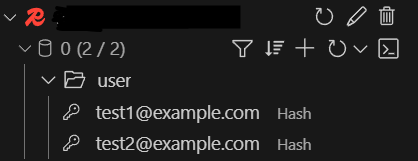
- hSet으로 Redis에 데이터를 저장한다.- 이게 전부이다... 암튼 전부임... Prisma보다 편하다!● 잘 저장되었을까?